
Search & navigation
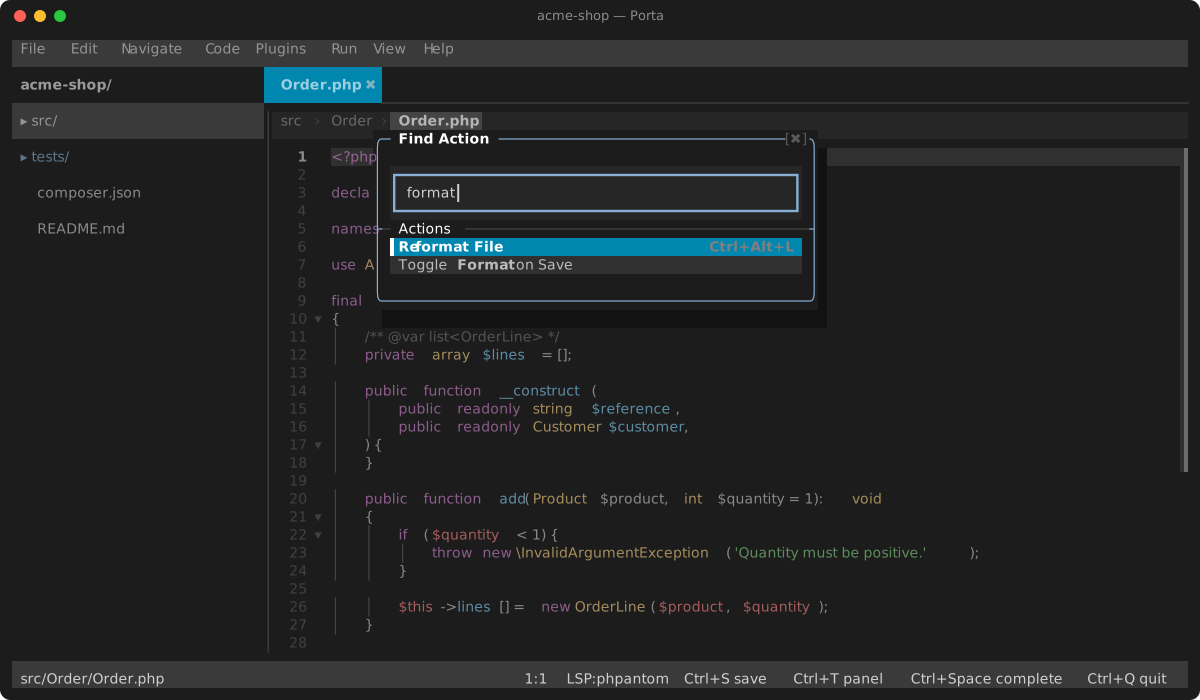
Go to…
| Key | Target |
|---|---|
Ctrl+Shift+N / Ctrl+P | File (fuzzy, camel-hump aware). A folder git ignores — a coverage report, var/cache/ — is left out, so it never crowds out your own files; a single ignored file such as .env is still found, and vendor/ too once searchIncludeVendor is on |
Ctrl+Alt+Shift+N | Symbol in project (workspace/symbol, live-filtered) |
Ctrl+F12 | Symbol in the current file (file structure popup) |
Ctrl+G | Line |
Ctrl+E | Recent files — the open tabs, then the files you have closed (press again to cycle) |
Alt+5 | Recent Locations — the places you jumped away FROM, newest first, with each line's text |
Ctrl+Shift+T | The test for the current class — or back: from FooTest.php to Foo.php. Searches the project (skipping vendor/) and flashes when nothing matches |
Ctrl+Shift+E | Search Everywhere — files, classes, symbols, actions, text and settings in one list; each group shows five, with a N more results row that grows it. The five is a SHARING rule: a picker with one group (Go to File, the settings search) fills its box instead, and still offers the same row past that |
Ctrl+Shift+A | Find Action (command palette — every command by name) |
Code navigation (LSP)
Go to declaration (Ctrl+B/F12), implementation (Ctrl+Alt+B), type definition (Ctrl+Shift+B) — a chooser opens when the server returns several targets — with a back-navigation stack (Ctrl+Alt+Left). Peek definition (Ctrl+Shift+I) shows the target inline without leaving the file — a whole small declaration, scrolled with the arrow keys, and Enter jumps to it. Quick documentation (Shift+F1) scrolls the same way, however long the server's answer is. Find usages (Alt+F7) fills the results panel.
Find in file
Ctrl+F finds incrementally with live match highlighting; Ctrl+R adds a replace field. It opens prefilled — with the selection if there is one, and otherwise with the identifier the caret is standing in, $sigil and all — and searches for it straight away, so finding the symbol under the caret is one keystroke. A caret standing in no word contributes nothing and the field keeps what it had; a multi-line selection prefills nothing, because the field is one line. F3/Shift+F3 cycle matches, Tab switches fields, Alt+R replaces the current match, Alt+A replaces all. Alt+X toggles regex mode, Alt+W whole-word and Alt+C match case (Aa). Alt+Enter, or the ∀ button, selects all occurrences, as PhpStorm's does: every match gets a caret with the match selected, the bar closes, and what you type replaces them all. It honours the query and its options, which the editor's word-based Ctrl+Alt+Shift+J cannot. Without Aa, an all-lower-case query ignores case and one with a capital does not (smart case) — for every letter, not only ASCII: été finds ÉTÉ, as it does in Find in Files. Note that in this bar Alt+R means replace; the Find-in-Files modal uses Alt+R for its regex toggle instead. In regex mode the replacement is a preg replacement pattern: $1 inserts the first captured group, \$ a literal dollar. An invalid half-typed pattern shows [bad regex] in place of the match counter and matches nothing.
A query that can find nothing draws the Find box with a double border: a bad pattern, one the engine gave up on, or no hit at all. The problem shows by shape as well as by the counter. ↑, ↓ and ✖ beside the tags step to the previous and next match and close the bar, like Shift+F3, F3 and Esc. The query field takes the caret keys: ←/→, Home/End, Delete, Ctrl+W.
Find in Files (Ctrl+Shift+F)
A centered modal with three fields (Tab cycles): Find, Replace and a file Mask (glob). Results preview live as you type, grouped by file; Shift+Enter makes the query multiline, Alt+↑/↓ recall recent queries. Full mouse support: click fields, toggles and result rows; wheel scrolls the preview; drag the split to resize the results pane.
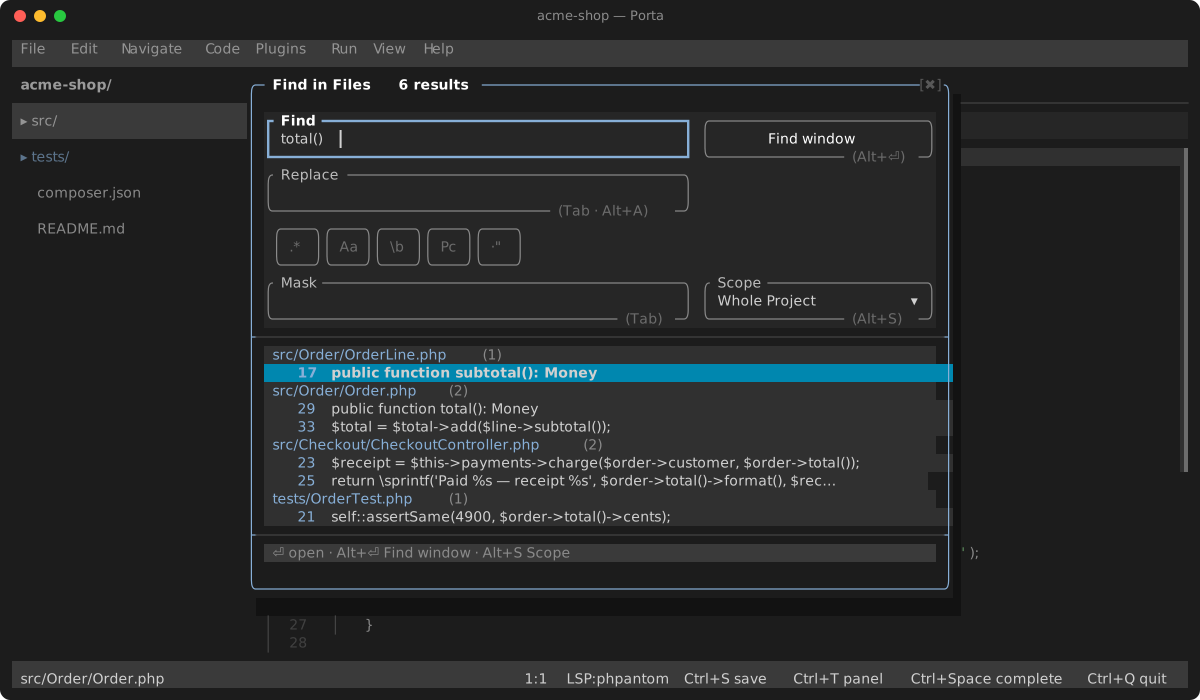
Toggles: regex (Alt+R), case-sensitive (Alt+C), whole-word (Alt+W), preserve-case on replace (Alt+V) and token scope (Alt+T).
Alt+S cycles the search scope. Five are built in, and the selector names what each one resolves to right now — Module (plugins/git), Open Files (3) — because three of them mean something different depending on which buffer you are in:
| Scope | Searches |
|---|---|
| Whole Project | the project root |
| Directory | the directory holding the current file |
| Current File | that file alone |
| Open Files | every open buffer; (0) when none are, which matches nothing |
| Module | the nearest directory above the current file holding a composer.json — or the whole project when there is none |
That last fallback is worth knowing: in a repository whose packages live under plugins/, editing anything in src/ gives Module (Whole Project), and the label says so rather than leaving "Module" to be read as a narrowing.
Saved scopes follow the built-ins in the same cycle — "Find in Files…" from a tree folder's context menu scopes to that folder and remembers it, and "Add to Search Scopes" pins one so it is never evicted.
Enteropens the selected match.Alt+Enterpromotes the whole result set to its own tab on the bottom dock — every search keeps its tab (same query re-uses it, a new query opens another) until you close it with the tab's✖;F5re-runs the shown tab's query.- Replace: with Replace filled, each match previews as
old → newwith an exclude checkbox (Deletetoggles).Alt+Aapplies to every kept match — open buffers as one undoable edit, other files on disk.
The search runs as async grep streamed through the event loop; the UI never blocks.
Structure panel (Alt+7)
The active file's symbols as a dock tab, indented by nesting with each one's kind beside it; Enter or a click jumps to the symbol. Unlike the Ctrl+F12 popup it stays open — switching buffers or saving re-reads the file into it, and F5 re-runs it on demand. While the tab is closed it costs nothing: no documentSymbol request is sent at all. Requires a language server.
PhpStorm's split, which Porta used to collapse onto the popup: Alt+7 is the persistent tool window, Ctrl+F12 the transient popup.
Problems panel (Alt+6)
Aggregated diagnostics across all open buffers — ✗ errors, ▲ warnings, sorted by file and line; Enter jumps to the diagnostic. The list is grouped by file and carries a filter field: type to narrow it to the file or message you are after, and Alt+G cycles the grouping (file / directory / nested), exactly as the Find tool does. The status bar carries live error/warning counts. Diagnostics come from the language server and from plugins that publish them (phpstan, mago, psalm).
F2 / Shift+F2 walk this file's problems without leaving the editor — the keyboard verb between the marker stripe, which shows where they are, and this panel, which lists them. They wrap at either end and say so, and the flash carries the diagnostic's own text rather than only the line it landed on.
Call hierarchy
Ctrl+Shift+H (or Navigate → Call Hierarchy) lists the callers of the function or method at the caret in the results panel — pick one to jump to the call site. Ctrl+Alt+Shift+H lists the other direction: what that symbol calls. Requires a language server with call-hierarchy support.