
Configuration
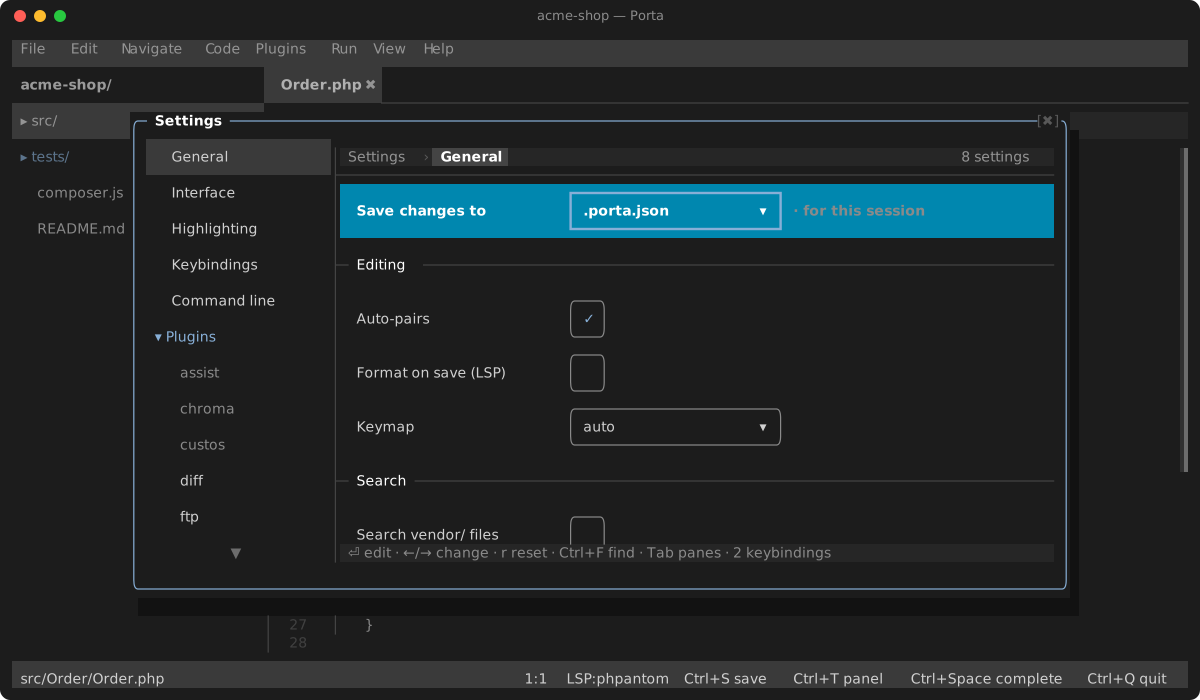
Porta reads two files, and the second wins:
| Scope | File | For |
|---|---|---|
| Global | ~/.porta/config.json | your preferences, on every project |
| Project | <root>/.porta.json | the team's, committed with the repo |
Both use the same format, described below. The global file is optional and does not exist until something writes it. Neither is required.
PORTA_HOME overrides HOME when resolving the global file, which is also how the global plugin directory is found — the two are siblings.
How the two are merged
Per key for settings, plugins, lsp and highlight.languages: setting your theme globally and your indentation per project is the ordinary case.
Three blocks are deliberately coarser, because a partial merge of one would produce a configuration nobody wrote:
keymapmerges per ACTION. A project namingsavereplaces that action's whole chord list rather than adding to it.languages.<lang>.debug.launchreplaces whole. A launch configuration is something an adapter either understands or does not.enabledPluginsis taken from the nearest file that names it, and an empty list counts as naming it. This is what lets a project turn off a bundled plugin that your global file turned on.
disabledPlugins is the one that unions. Both files are saying "not this one", and an override that silently re-enabled a plugin you turned off globally would be the opposite of what either file asked for.
A warning names the file it came from, so a mistake in one is not reported against the other.
Which file the Settings screen writes
Every page that persists something leads with a Save changes to row. It is a session choice, not a stored setting — there is no good file in which to store "which file".
It starts on the global file, so a preference does not dirty a repository. The exception: if the project's .porta.json already has a settings block, it starts on the project instead. Your next edit landing somewhere new while the old values sit visibly in that file, still overriding it, is the surprising outcome — not the safe one.
The same choice decides where a plugin is installed, because it is the same question: are you configuring this project, or yourself?
Where a shown value came from
Rows carry a dim tag when the answer is not obvious:
from global— the value comes from~/.porta/config.json, which is not the file you are editing if the scope row says otherwise.overrides global— the project file sets this, and a different value sits in the global file underneath it.
Nothing is tagged in the ordinary case: a value the project sets and nothing else, or a value nothing sets at all. A tag on every row is a tag on no row.
When a change will not take effect here
Writing into a key the other file also sets is allowed — it is a correct write to the file you chose — but it may change nothing you can see, because the merge rules above decide which layer wins. Rather than refuse the edit or report a success that is not one, Porta says so:
| You did | And | It says |
|---|---|---|
| Saved to the global file | the project sets that key | Saved to ~/.porta/config.json — .porta.json overrides it in this project |
Pressed r on a global value | the project still sets that key | Cleared from ~/.porta/config.json — .porta.json still overrides it here |
| Enabled a plugin | the other file lists it in disabledPlugins | <plugin> stays off — <file> disables it |
| Rebound an action | the other file binds that action | <action> keeps its binding — <file> sets it |
In the last two the operation reports nothing else — no "enabled", no "rebound" — because it did not happen.
Refusing these edits was considered and rejected: setting a personal default for a key that some open project happens to pin is a reasonable thing to do, and refusing would make the global value unreachable from inside the project that shadows it.
Turning bundled plugins on and off
enabledPlugins is an explicit list, so the first write to a file that has none has to invent one. It starts from the list already in effect, not from the shipped default — otherwise turning one plugin off in a project would silently turn back on every plugin you had turned off globally.
Trusting a project
A project can run code of its own: plugins in .porta/plugins, binaries and commands its .porta.json names, tools in its vendor/bin, and whatever its own config tells a language server to run (a .phpantom.toml can name the program phpantom runs as PHPStan). Since a project is something you clone, Porta asks before it runs any of that. The first time you open a project, porta asks whether to trust it; the project switcher asks the same before a switch. The answer is kept either way, in ~/.porta/trusted-projects.json.
An untrusted project opens restricted. Nearly everything you configured globally still applies; what the project says is believed except where it names something to run:
- no language server starts, not even one you configured globally — a server reads the project's config and runs what it names — so there is no completion or diagnostics, and the status bar says
LSP:off — project not trusted(an explicit--lspon the command line still starts that one, and so does one run elsewhere that reads nothing of the project: assist's relay to the host's server); - its
.porta/pluginsare not loaded; - no plugin is installed in it, nor removed from it: composer would run what its
.porta/composer.jsonsays (installing for every project still works); - its
.porta.jsonloseslsp,enabledPlugins(porta --plugin <name>still turns a bundled plugin on, for that project and that launch: the command line is yours, andporta assistopens a host's copy restricted withassiston this way), eachlanguages.<id>.runCommandanddebug, and every plugin setting naming a program or a command line (binary,path,command,dotPath,ghBinary,svgConverter,args, symfony-lsp'sphp-commandandruntime-indexing, review'shostsandprovider, anoutputDir, git'sworktreeFolder, assist'smailboxandtransitservers, mcp'sallow…permissions for agents); - tools are found on your
PATH, never in itsvendor/bin; - phpstan, psalm, php-cs-fixer and mago do not run at all — their own config files can execute the project's PHP or a program it names (a
mago.toml[extension-hosts]command), whichever binary reads them; - the tabs it reopens from its last session are its own files only: a
.porta/session.jsonthat came with it cannot open one elsewhere on your machine, where an agent reading the open buffers would reach it; - an agent connected through the mcp plugin runs none of its tasks or tests, even with
allowRunson in your own config — the Run menu's tasks are its composer scripts, its Makefile and its PHP, andrun_testsis itsvendor/bin/phpunit. The Run menu itself still runs what you pick there; - git runs no program the repository names: its hooks (
.git/hooksandhook.<name>.command), and every command its own.git/configsets — fsmonitor, filter, textconv and merge drivers (a merge uses git's own),gpg.program, credential helpers,core.sshCommand, a remote'suploadpack. Your own value for the same key still applies. Its.gitattributesare ignored, git:// and ext:: remotes are refused, automatic gc is off, and git does not look into submodules (their changes do not show). Where a name cannot be overridden, or git cannot read the repository's config (a malformed one, a git older than 2.26), git does not run there at all; - a Mermaid diagram's remote images are not fetched — the Mermaid CLI's browser is kept off the network, so opening one tells no one you did.
Trust This Project and Open This Project Restricted in the command palette change the answer and reopen the project.
Trusted or not, what Porta keeps of a project in its .porta/ folder (the session, the layout, the logs, local history, local reviews) is never written through a symlink. A .porta/ that came with a clone cannot aim those writes at a file of yours: where a link is in the way, it is not saved.
.porta.json
Per-project configuration, read from the project root. All keys are optional; unknown keys and invalid values are reported as status-bar warnings at startup and skipped. The IDE persists its own edits (from the Settings view and palette toggles) back into this file, preserving anything else in it.
{
    "keymap": {
        "duplicate_line": ["ctrl+shift+d"],
        "php-cs-fixer:fix": ["ctrl+alt+f"]
    },
    "settings": {
        "language": "en",
        "theme": "dark",
        "diagnosticMessages": "inline",
        "inlayHints": "tooltip",
        "lineNumbers": "absolute",
        "autoPairs": true
    },
    "languages": {
        "php": {
            "indentStyle": "spaces",
            "indentSize": 4,
            "debug": {
                "adapter": "node /path/to/php-debug-adapter.js",
                "launch": {"runtimeArgs": ["-dxdebug.mode=debug"]}
            }
        }
    },
    "lsp": {
        "php": "vendor/bin/phpactor language-server",
        "typescript": "typescript-language-server --stdio"
    }
}
keymap
action id → key or list of keys; see keybindings.md. Applied on the next launch. Plugin command ids (containing :) bypass the catalog validation and bind if the plugin loads.
settings
| Key | Default | Effect |
|---|---|---|
language | "auto" | UI locale: auto (the system's: LC_ALL, LC_MESSAGES or LANG on Linux and macOS, the display language on Windows via ext-intl; English when Porta has no catalog for it), en, fr, de, es, it, ja, he (Hebrew mirrors the layout right-to-left) |
theme | "dark" | Color theme: dark, light or high-contrast (WCAG-AAA pairings) — swaps chrome and syntax colors live |
diagnosticMessages | "none" | Where a diagnostic's message shows besides the pointer's card and Ctrl+F1: none (PhpStorm's default), inline (dimmed after the line's code) or menu (at the top of the Alt+Enter quick-fix list). The squiggle, the line number's tint, the stripe, the problem card and the Problems panel show in every mode. Replaces inlineDiagnostics (true → inline, false → none), which still loads and is retired the first time this one is written |
inlayHints | "inline" | Where the language server's inlay hints (parameter names, types, reference counts) show: none (not requested at all), inline (a shaded pill in the line) or tooltip (a card when the pointer rests on the word) |
inlayParameterHints | "literals" | Which parameter-name hints show: none, literals (only before an argument that is a number, a string, an array, null, true or false, as PhpStorm does; a by-reference parameter always shows) or all |
inlayTypeHints | true | Show the inferred-type hints (: int after a variable) |
lineNumbers | "absolute" | Gutter numbering: off, absolute or relative. Replaces relativeLineNumbers, which still loads and is retired the first time this one is written |
autoPairs | true | Auto-closing brackets and quotes |
breadcrumbs | true | The navigation bar above the editor: the file's path, then the scopes around the caret. Off, a previewed file (Markdown, SVG, a diagram) still shows its Editor / Split / Preview toggles on that row |
stickyScroll | true | Pin the enclosing scope headers to the top while scrolling |
indentGuides | true | Vertical rules at each indent level |
methodSeparators | false | A rule between members of a class |
showWhitespace | false | Render spaces and tabs as glyphs |
softWrap | false | Continue a line longer than the pane on the next rows instead of scrolling sideways — in the editor, the diff pane, the merge view's sides and the Review view's file pane. Alt+Z toggles it and saves the choice |
tabBarPosition | "top" | Where the editor tab strip sits: top, bottom, left or right |
keymapPlatform | "auto" | Whose shortcut conventions the default keymap follows: auto (the platform you type on — macOS, Windows, including WSL and Windows Terminal, or Linux), macos (adds the Cmd chords — see Keybindings), windows or linux (each adds keys for the chords its terminals keep — see Keybindings). Set it when the IDE runs somewhere other than your keyboard, as over SSH. Your own keymap entries always win |
searchIncludeVendor | false | Let Find in Files and Go to File descend into vendor/ |
formatOnSave | false | Format via the language server before each Ctrl+S save (single-file saves only; a 2s timeout saves unformatted with a flash) |
pixelRatio | "auto" | What a 100% zoom means in the image and graph viewers, on a terminal that draws pixels: one document pixel per logical pixel of the display, as a browser shows it. auto asks the system (the backing scale on macOS, GDK_SCALE or QT_SCALE_FACTOR on Linux, and 1 over SSH, where the screen is another machine's); 1, 1.25, 1.5, 2 or 3 names it |
cursorShape | "bar" | Hardware cursor shape: bar, block or underline — screen readers follow the hardware cursor |
tooltips | true | A card saying what a glyph, a toggle or a cut name means when the pointer rests on it |
tooltipDelay | 500 | How long the pointer rests before a tooltip shows, in milliseconds (0–2000; the next one shows at once while a card is up) |
displayName | "" | Your name, as the others at work on the project see it — beside your caret and in their roster. Empty uses your login name ($USER), else anonymous. Control characters are dropped and it is cut to 40 characters. The assist plugin uses it too (it replaces that plugin's own displayName) |
sharePresence | true | Tell other Porta instances on the same project where you are: your name, your open file and your caret, in .porta/presence/ — this folder's, or the server's for a remote project. Off, you still see them; they no longer see you (see Participants) |
toolUpdateCheck | "daily" | How often Porta looks, in the background, for newer versions of the tools your enabled plugins run — daily, weekly or off. Only tools Porta installed and can update are asked about, and not composer ones — composer update keeps to your project's constraint, so Packagist's newest may be out of its reach; what it finds is said once, in one toast, and shown beside each tool on its plugin's Settings page. A failed lookup says nothing |
All of these apply live when changed from the Settings view or the palette commands (Cycle Diagnostic Messages, Cycle Inlay Hints, Cycle Line Numbers, Toggle Auto-Pairs, Soft-Wrap).
relativeLineNumbers and inlineDiagnostics are the two keys here that are no longer current: a .porta.json still carrying one is read without complaint, and writing its successor (lineNumbers, diagnosticMessages) from the Settings view retires it. The old Markdown preview switch is gone: the Editor / Split / Preview toggles over a previewed file choose per file, and a stale key is ignored, then dropped on the next write.
languages.<id>
Per-language overrides for: php, javascript, typescript, python, json, css, scss, html, markdown, yaml, twig, xml, dotenv.
dotenv is the one id matched by NAME rather than extension: any file whose name starts with .env, except .env.local.php and its siblings, which are real PHP.
indentStyle—"auto"(detect from the file),"spaces", or"tabs".indentSize—"auto"or a positive integer.debug— the DAP adapter for this language; see debugger.md:adapter— the adapter command (string or argv list),launch— a JSON object merged into the DAP launch request.
templates— your own live templates: abbreviation => LSP snippet body, layered over the built-in set. See editor.md.
{
    "languages": {
        "php": {
            "templates": {
                "dd": "dd($1);$0",
                "logi": "$this->logger->info(${1:'message'}, [$0]);",
                ".dd": "dd({{expr}});$0",
                "fore": ""
            }
        }
    }
}
An abbreviation starting with a dot is a postfix template: {{expr}} is replaced by the expression to the left of the dot. An entry whose body is the empty string removes a built-in — the only way to stop a shipped abbreviation expanding over something you type as ordinary code, since a map has no settings row. Templates merge per abbreviation across config scopes, so a project adding one keeps the set you defined globally.
plugins and disabledPlugins
Plugin-registered settings persist per plugin, and disabled plugins are listed by name (bundled plugins can be disabled, never removed):
{
    "plugins": {
        "phpstan": {"binary": "/opt/phpstan/phpstan"}
    },
    "disabledPlugins": ["psalm"]
}
Both are normally written by Settings → Plugins → <plugin>; see plugins.md.
lsp
Either a single server command for everything:
{"lsp": "php phpactor.phar language-server"}or a per-language map (as in the large example above). Editing a language's LSP server in the Settings view converts the single-command form to a map, keeping the original command under the * key. A --lsp command-line override wins over both.
The per-language maps of the global and project files merge per language, the project's winning. A single command in the project file wins over everything in the global file; one in the global file applies only when neither file has a map, and wins over PORTA_LSP.
The Settings view (Ctrl+,)
A window over the editor — movable, resizable, closed by Esc — with a resizable sidebar: General, Interface, Highlighting, Keybindings, Command line, then a Plugins folder with a page per installed plugin and a Languages folder with a page per language. The folders open and close as the file tree's do (←, →, Enter or a click). Each page's header is its trail — Settings › Plugins › git — and a click on Settings or Plugins goes to that page.
- General — the
settingstable above, edited live (theme and language switch immediately, including a full RTL re-layout for Hebrew). - Keybindings — every action with its current binding;
Enterarms a capture, the next keypress becomes the binding (persisted to.porta.jsonand applied live — IDE-level dispatch and menu shortcut labels re-merge immediately). - Command line — Porta outside the IDE, each installed, updated and removed from here: the
portacommand (a symlink,~/.local/bin/portaunless one is already on yourPATH; aportaput there some other way is shown and left alone), Porta as git's difftool and mergetool, and — for the phar — updating Porta itself (--self-update, run in the background). A removal takes two presses. - Plugins — install (git URL or local path, project or global scope) and remove plugins; see plugins.md.
- Languages — indent style/size, the LSP server command (live: the pool is reconfigured and buffers re-opened), and the debug adapter + launch config (next debug session).
.editorconfig
A file's nearest .editorconfig (resolved by walking up to the first root = true) is always honored:
- live:
indent_style,indent_size,tab_width - on save:
end_of_line,trim_trailing_whitespace,insert_final_newline charsetproduces a warning only — the editor is UTF-8 only
The per-language indent settings (Settings → Languages) supersede it: a language whose indent style/size is not auto wins over the file's .editorconfig for that field.
Project-local state: .porta/
The IDE writes a .porta/ directory into the project you open:
| Path | Contents |
|---|---|
.porta/session.json | Open buffers, cursor positions, pins and each previewed tab's Editor / Split / Preview arrangement, restored when you launch without a file argument |
.porta/recent-files.json | The files this project has had open, newest first, capped at 32 — what Ctrl+E offers below the open tabs |
.porta/layout.json | Pane proportions (sidebar widths, bottom-panel height, git view splits, the editor's share beside a live preview) — hand-editable |
.porta/history/ | Local-history snapshots (see below) |
.porta/reviews/ | Local code reviews an agent writes and you answer — see review.md |
.porta/plugins/ | Installed project-scope plugins |
enabledPlugins (in .porta.json) | Bundled plugins to load. When the key is ABSENT, image-viewer, graph-viewer, todo, local-history, diff, git, ssh and ftp are on by default; an explicit list (even []) replaces that default entirely, so a list written before one of them existed silently leaves it off — TODO scanning and local-history snapshots are the two that go quiet, and a list naming git but not diff (which git needs since diff moved out of it) skips git with a warning |
Add it to your project's .gitignore (keep plugins/ if you want to version your project plugins):
/.porta/Local history snapshots every save (capped at 25 per file) independently of git; restore any snapshot with Ctrl+Alt+H.
Environment variables
| Variable | Effect |
|---|---|
PORTA_LSP | LSP server command (same format as the lsp config key) |
PORTA_KEYMAP_PLATFORM | macos, windows or linux: the platform the auto keymap takes for the one you type on, instead of detecting it — for a shell profile on a server you reach from several machines |
PORTA_TRUSTED_FOLDERS | :-separated folders whose every project is trusted without asking — for a CI box or a sandbox (Trusting a project) |
PORTA_HOME | Overrides the home directory used for global plugins (~/.porta/plugins) and scratch files (~/.porta/scratches) |