
Code review
The bundled review plugin shows code-review conversations and lets you answer them without leaving Porta. It supports three sources:
- a GitHub pull request;
- a GitLab merge request;
- a local review that an agent (Claude Code, a script, a colleague's tool) writes into the working copy.
It is off by default. Turn it on under Settings → Plugins → review; it needs the git plugin, which is turned on with it.
Where the review comes from
The plugin looks for the review of the current branch:
- A local review, when one is on disk under
.porta/reviews/. If there are several, the most recently written one is used. - Otherwise, the forge the branch's remote lives on. That remote is the branch's upstream, or
originwhen the branch has none. The pull or merge request is the open one whose source branch is the upstream's name.
github.com and gitlab.com are recognised on their own. For anything else, name the host in the hosts setting — the forge's token goes to that host, so Porta never guesses one from its name: ghe.corp.com=github, git.corp.com=gitlab. The provider setting pins one source instead of choosing — the forge, not the host: a token still goes only to one of those.
Review → Choose Review… switches between the local reviews on disk and the branch's pull or merge request.
Signing in
The plugin uses the forge's own command-line tool, gh or glab, and so whatever login you already gave it. It never stores a token. Without the tool, it falls back to curl with a token from the environment:
| Forge | Variables, first set wins |
|---|---|
| github.com | GH_TOKEN, GITHUB_TOKEN |
| GitHub Enterprise | GH_ENTERPRISE_TOKEN, GITHUB_ENTERPRISE_TOKEN |
| GitLab | GITLAB_TOKEN |
The token goes to curl on its standard input, never on the command line.
The Review view
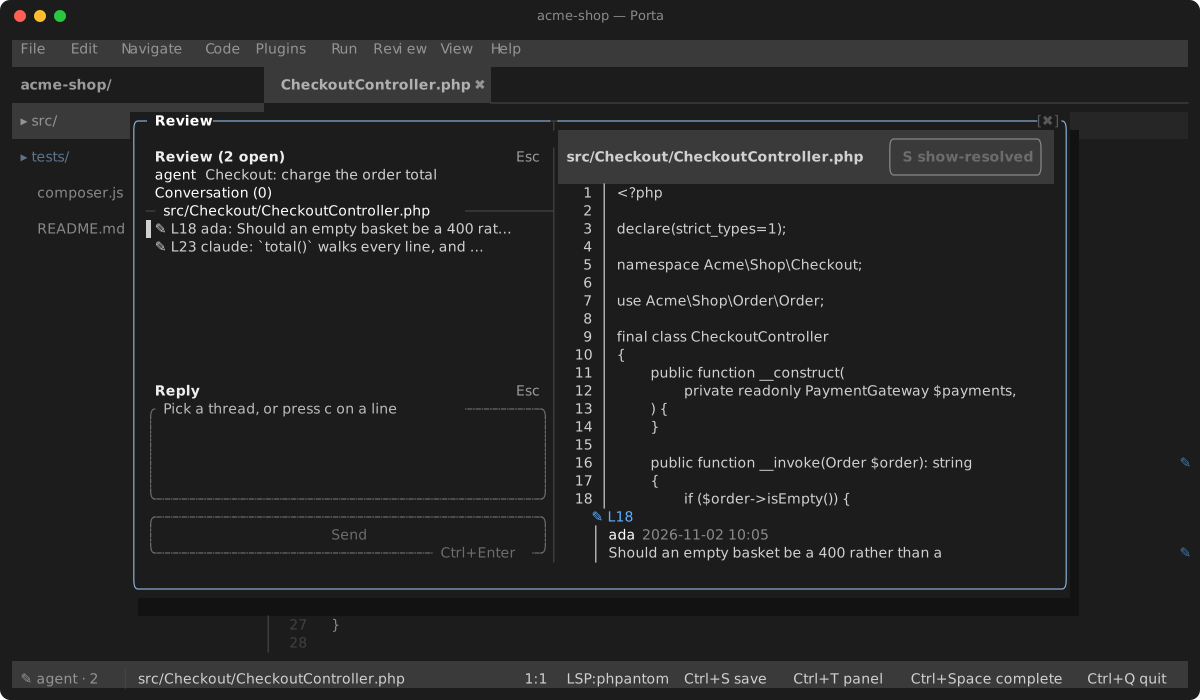
Open it with Review → Show Review, or Show Review in the command palette.
The left column is resizable: drag the separator. Its width is kept per project, like the git view's. The file pane's toolbar carries a show-resolved toggle (s, or click it), like the git diff's hide-whitespace: it writes the showResolved setting, so it persists, and the editor follows. Everything in the view answers the mouse — an entry, a row, the Send button.
- Left, top — the review. Its title, the Conversation (review-level comments), then each file's threads under the file name. A thread's row shows its line, the first comment and how many replies it has. Resolved threads are hidden unless
showResolvedis on; when shown they are ticked✓and dimmed. - Left, bottom — the reply box. Its legend says where the words will go before you type them.
Ctrl+Entersends. - Right — the thread's file. The review's own diff, drawn as the git view draws one — syntax colours, green and red bands, the changed words a shade stronger — with each thread written under the line it is about. When there is no diff to show, it shows the file itself: a local review of a file with nothing uncommitted, or a forge review whose commits you have not fetched. The Conversation shows here too. Under core's soft wrap (
Alt+Z) a long code line continues on the rows below, and a key on any of them acts on that line.
| Key | In the list | In the file pane |
|---|---|---|
↑ ↓ PgUp PgDn | Move between entries | Move between rows |
Enter | Show the entry | Open the file in the editor, at the line |
r | Reply to the thread | Reply to the thread the caret is in |
x | Resolve / reopen the thread | The same |
c | Comment on the review itself | Start a thread on the line the caret is on |
o | Open the thread's line in the editor | — |
s | Show / hide resolved threads | The same |
F5 / Shift+R | Re-read the review | — |
Tab | Next pane | Next pane |
Esc | Close the view | Close the view |
A reply, a resolve and a new comment go to the forge, or to the local review's files. The review is then read again, so what you see is what the forge recorded.
Keys
The Review view (Review → Show Review); Tab cycles panes and Esc closes.
| Key | Action |
|---|---|
Enter | In the list, show the entry; in the file pane, open the file at the caret's line |
r | Reply to the thread (the selected one, or the one the caret is in) |
x | Resolve or reopen that thread |
c | In the list, comment on the review itself; in the file pane, start a thread on the caret's line |
o | Open the thread's line in the editor |
s | Show or hide resolved conversations — the toolbar toggle on the file pane, kept like the git view's |
F5 / Shift+R | Re-read the review |
Ctrl+Enter | Send what the reply box holds |
In the editor
A thread shows on the line it is about now:
- For a forge review, the line is translated from the reviewed commit to your working copy through
git diff <head> -- <file>. A thread whose line you have since rewritten is not placed; the view still lists it. - A local thread carries its line's text, and is found by that text nearest to where it was.
How much it shows is the editorDisplay setting:
| Value | Shows |
|---|---|
off | Nothing in the editor |
gutter (default) | ✎ in the gutter's marker column and on the scrollbar stripe. The pointer over it reads the thread in the status bar |
summary | The mark, and the first comment dimmed after the line, beside any blame note |
inline | The mark, and the whole conversation as rows under the line |
The editor's right-click menu adds Show Conversation on This Line, which opens the view on that thread. It also adds Comment on This Line, which opens the view with the reply box aimed at the caret's line.
The status bar shows the review and how many threads are open: ✎ PR #12 · 3.
Local reviews: the format an agent writes
A local review is a directory. Nobody rewrites anybody else's file: a comment is a new file, and resolving a thread adds a marker file. So an agent and the IDE can write at the same time with plain file tools.
.porta/reviews/<review>/review.json                  {"title": "…", "base": "main"}   optional
.porta/reviews/<review>/<thread>/thread.json         {"path": "src/A.php", "line": 12, "lineText": "…"}
.porta/reviews/<review>/<thread>/<stamp>--<author>.md one comment; the file is its text
.porta/reviews/<review>/<thread>/resolved            present while the thread is resolved
.porta/reviews/<review>/conversation/<stamp>--<author>.md review-level commentspathis relative to the project root, andlineis 1-based in the working copy.lineTextis the line's text, which lets the thread follow the line when edits move it.sidemay be"old"for a line the diff removed; it defaults to"new".- Comments sort by file name, so start the name with a sortable stamp, for example
20260929T101500Z--claude.md. baseis what the view diffs the files against. It defaults toHEAD, which is what a review of uncommitted work wants.- Your replies are signed with git's
user.name.
The IDE notices new files within two seconds. An agent reads your replies back by listing the thread's directory.
porta review — the same, from a shell
An agent need not write the files itself:
| Command | Does |
|---|---|
porta review add src/Cart.php:9 "Use array_sum here." --author=claude | Start a thread on a line — its text recorded for you — and print the thread's id |
porta review reply <thread> "Done." | Answer a thread |
porta review resolve <thread> / reopen <thread> | Resolve it, or undo that |
porta review comment "Overall fine." | Comment on the review itself |
porta review list | Every thread and its answers; --json for a program to read |
A message of - is read from stdin. --review <name> picks the review — by default the newest on disk, and a first one is named after its author; --title names it in the IDE. Comments are signed with --author, else $PORTA_REVIEW_AUTHOR, else git's user.name. It finds the project from any directory inside it. A name that is not one directory under the reviews directory — a /, a .. — is refused.
A prompt that has an agent review your uncommitted changes this way:
Review my uncommitted changes. For each finding, run
porta review add <file>:<line> "<comment>" --author=claude. When I say I have answered, runporta review list --jsonand act on my replies.
Through the IDE, with the mcp plugin
With the mcp plugin on, an agent connected to the running IDE has review_threads, and with mcp's allowPublish on, review_reply, review_resolve and review_comment. They work on whichever review the IDE shows — a pull or merge request as well as a local one — and go through the same path as the view, so a reply posts as you. A call made while the review is loading waits for it, for up to thirty seconds.
Settings
| Key | Default | Meaning |
|---|---|---|
provider | auto | auto, github, gitlab or local |
editorDisplay | gutter | off, gutter, summary or inline (above) |
showResolved | false | List and show resolved threads |
refreshSeconds | 0 | Re-read a forge review this often; 0 only on demand, on opening the view, after a push or fetch, and on a branch switch |
hosts | — | Self-hosted forges, host=github or host=gitlab, comma-separated |
ghBinary, glabBinary | — | The CLI's path when it is not on PATH |