
Agents (MCP)
The bundled mcp plugin runs a Model Context Protocol server inside Porta. An agent such as Claude Code then works with the IDE you have open, not just the files on disk. It can:
- see what you are looking at;
- read buffers with their unsaved edits;
- read what the language servers found;
- open a file at a line for you;
- make an edit you can undo.
It can also call every tool the other plugins offer.
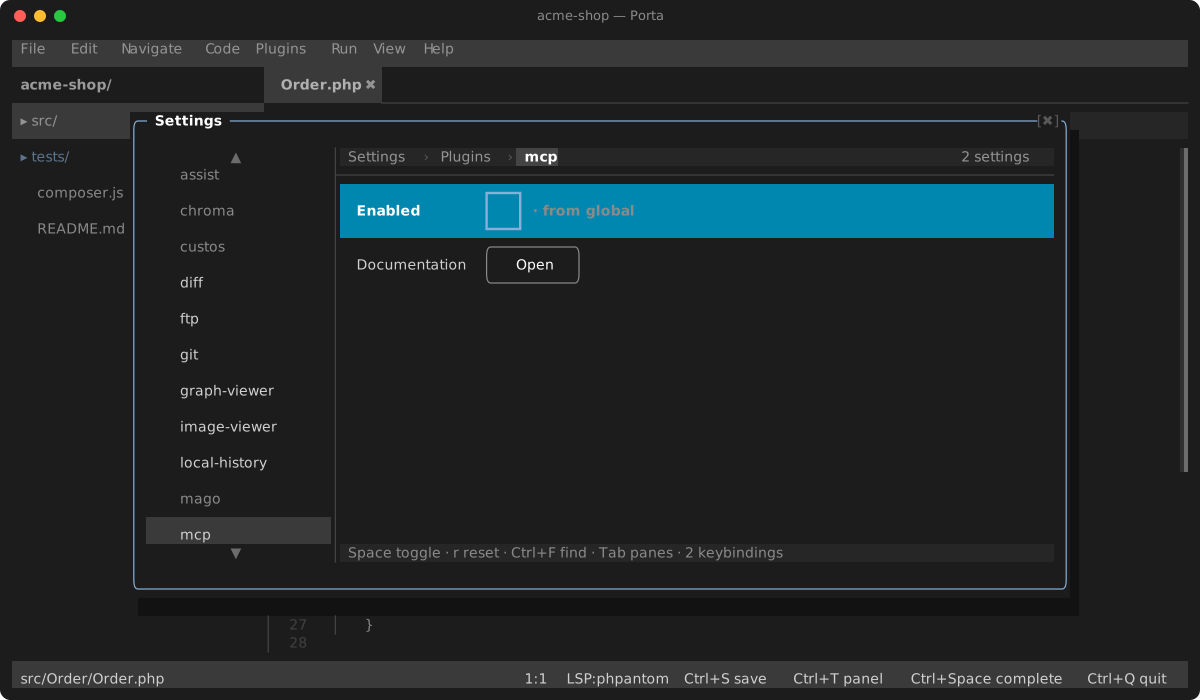
It is off by default. Turn it on under Settings → Plugins → mcp.
Connecting an agent
The agent launches porta mcp, which connects to the Porta open on the project:
claude mcp add porta -- porta mcpThat needs porta on your PATH: Settings → Command line puts it there. Or give the full path, which porta mcp --help prints ready to paste. Other clients take the same command, run from the project directory or anywhere below it.
The agent usually starts before the IDE, and outlives it. So porta mcp does not give up when no IDE is open: it waits, and connects when one opens on the project. Until then the agent sees a server with no tools, and a call is answered with what to open. When the IDE quits, a call it was running is answered with an error. When it comes back, the agent is told its tools changed. --wait=<seconds> makes it give up after that long without an IDE.
The IDE listens on a unix socket, .porta/mcp.sock, that only your user can open. When the project path is too long for a socket, the socket goes in the temp directory under a random name, and .porta/mcp.sock.path says where — only a name Porta itself would choose is believed there, of a file that is yours (in a temp directory other users share, theirs is never taken for the IDE), and only a socket is ever removed. .porta/mcp.sock is held to the same: a link there, or a .porta/ that is one, as a cloned project could carry, is never connected to, bound through or removed. The socket is removed when Porta quits or the plugin is disabled. A second Porta on the same project leaves the first one's socket alone, and takes over serving MCP once that one quits.
Claude Code sees what you have open
Porta is also an IDE the claude CLI connects to, the way it connects to VS Code or a JetBrains IDE:
- The prompt shows the file in front of you (⧉ In A.php), or how many lines you selected. Claude reads that selection with your next message.
- Claude can open a file in Porta, and knows your open tabs, the project folder and the diagnostics.
With Porta open on the project, run /ide in claude and pick Porta. A claude started in Porta's own terminal connects by itself.
Send Selection to Claude Code (from the command palette) points Claude at the lines you selected, or at the file, as an @ mention.
Claude's proposed edits are shown here. When Claude wants to change a file, Porta brings the file to the front with the change applied in place, as one undoable edit. The Claude's Proposed Change list in the dock shows the change as a diff: the lines it removes (-), the ones it adds (+) and a little around them. A row takes you to its line. With the git plugin on, the git view also opens with the proposal side by side with the file as it is, read-only; Esc closes it. The claudeSideBySide setting turns that off. While the comparison is shown, nothing covers it: a notice says the change waits, and Ctrl+Alt+Y keeps it, Ctrl+Alt+U puts the file back. Those keys work from anywhere, the comparison included. Without the side-by-side view, Porta asks you to Accept or Reject in a list instead:
- Accept (or
Ctrl+Alt+Y) keeps the file as it stands, including anything you touched up before accepting. Claude Code then writes it to disk, as it does with any IDE, and the tab reads as saved. - Reject (or
Ctrl+Alt+U) puts the old text back.
Claude asks this only for an edit it would otherwise ask you to approve. An edit your Claude settings already allow (an Edit allow rule, or accept-edits mode) is made without asking, here or in the terminal. Claude waits for your answer. If you dismiss the question, Review Claude's Proposed Change brings it back. While a proposal is shown, Claude Code appears as any agent does: its caret and name at the change, a ✦ on the file's tab. Local history keeps the file as it was before Claude's first change to it. A file with unsaved edits in Porta is not overwritten: that proposal is turned down, with a notice to save or discard your edits first.
Behind the scenes, Porta listens on 127.0.0.1 only, on a port it announces in ~/.claude/ide/<port>.lock ($CLAUDE_CONFIG_DIR/ide when that is set). A lock a Porta left behind when it was killed is taken back the next time one starts, so the CLI is never pointed at a port nobody listens on. That file is readable by you alone and holds the token a connection has to present. It is removed when Porta quits. The claudeCode setting turns all of this off.
What it can do
| Tool | Does |
|---|---|
context | The project root, the active file and caret, the files selected in the tree, and every open tab with whether it has unsaved edits |
selection | What you have selected in the active file, and where |
read_buffer | The text of an open file as it is in the editor — unsaved edits included. Without a path, the active file. startLine/endLine read part of it, lineNumbers numbers the lines |
open_file | Open a file and bring it forward, optionally at a line and column |
diagnostics | What the language servers and analysers report for the open files |
notify | Show you a short message |
edit_buffer | Replace one exact piece of a file's text in the editor — opening it first if needed. The piece must occur exactly once |
replace_buffer | Replace a file's whole text in the editor — opening it first if needed |
insert_text | Insert text at the caret |
save_buffer | Save an open file to disk, as Ctrl+S does — off until you turn on allowSave |
search | Find text across the project like Find in Files: regex, case, whole word, a file mask, a set of paths |
definition | Where the symbol at a position is declared, asked of the language server |
references | Every place that symbol is used, its declaration included |
hover | What the language server says about it: signature and documentation |
symbols | The project's classes, functions and other symbols whose name matches a query |
outline | What one file declares — classes, methods, functions — nested, with positions |
format | Format a file as its language server does, as one undoable edit — not saved |
rename | Rename a symbol everywhere the language server finds it — off until you allow both edits and saves |
The code tools ask the language server the IDE already runs, about any file of the project — open or not, with nothing shown and no tab moved — so an agent gets the precise answer a text search for a name is not.
format and rename change code, as the editor's Reformat and Rename do. format edits the buffer, unsaved, like the other edit tools. rename also rewrites the files that are not open, since a rename has to reach every use. So it is offered only with both allowEdits and allowSave on, and Undo Refactoring takes the whole rename back. A column counts UTF-16 code units, as the protocol does. A server that does not answer within the lspTimeout setting (15 seconds) is given up on.
Lines and columns are 1-based, as compilers and grep print them. Paths are project-relative or absolute, and must be inside the project.
An agent's edit does not take your screen. A file it changes opens in a tab behind yours, or is changed where it already is. Your caret and selection stay where you left them, moving only with the text they sat in, so you can keep typing in the same file. Turn on followAgent to have each file it edits brought to the front instead.
You see an agent at work. Where it edits or reads, a caret appears in its colour, with its name at the end of the line (✦ Claude). A ✦ in the same colour marks the file's tab and its row in the project tree, and the tooltip says who is editing or reading it. The status bar names the agent and what it last did (✦ Claude editing A.php). Its menu takes you to the file each agent is at, opens Recent Changes — where whatever an agent replaced or deleted can be restored — or stops showing agents. The caret keeps its place in the text while you type around it — above it, or earlier on its line. All of it goes after agentFade seconds (10) without the agent touching the file, or at once when it disconnects. Each agent keeps one colour; a fifth shares the first's. Turn showAgentCursor off to keep the marks without the caret in the text, or showAgents off to see none of it.
Edits are not saved unless you say so. Each one is a single undoable step in the editor, so you review it, keep it with Ctrl+S, or take it back with Ctrl+Z. Turn the allowEdits setting off and the edit tools are not offered at all. Turn allowSave on and the agent may save too — as Ctrl+S does, so local history keeps the version it replaced. A file that changed on disk while it held edits is never overwritten: the agent is told to ask you.
search reads the files on disk, as Find in Files does, with its excludes (vendor, node_modules, .git…) and its 500-match cap; an unsaved edit is what read_buffer is for.
Running tasks and tests
With allowRuns on — it is off until you turn it on — the agent can run what the Run menu offers, and the project's PHPUnit tests. Never in a project you have not trusted, though, even with allowRuns on in your own config: those are the project's own code, and an agent's pick is not yours.
| Tool | Does |
|---|---|
run_configurations | The Run menu's tasks right now: the active PHP file, composer scripts, Makefile targets |
run | Run one of them by its label |
run_tests | Run vendor/bin/phpunit — all tests, a file or directory, and/or a --filter |
run_output | What a run printed so far, whether it is still running, its exit code |
Each run is a tab in the terminal panel, so you can watch it — but starting one neither opens the panel nor takes your focus. A call waits for the run to end, up to runTimeout (300 seconds), and answers with the exit code and the end of the output; a longer run goes on, and run_output reads it later. Running a label again replaces the run in progress, as the Run menu does.
Creating, moving and deleting files
With allowFileOps on — it is off until you turn it on — the agent can change the files themselves:
| Tool | Does |
|---|---|
create_file | Create a file with its text, and its folders on the way. It is not opened |
move_file | Rename or move a file or folder. A tab open on it follows, with its unsaved edits |
delete_file | Delete a file. Never a folder, and never a file with unsaved edits in the editor |
Every change is revertable through local history (the bundled local-history plugin):
- A deleted file is kept, with the text you last had, unsaved edits included. It is listed in Recent Changes, and restoring it brings the file back. This holds for every delete, the tree's own included.
- Before an agent first edits a file, the version you had is kept, so the file as it was before any agent touched it is one restore away. Ctrl+Z still undoes each edit.
- A moved file keeps its history under its new name.
- A created file is undone by deleting it, which is itself kept.
From other plugins
Any plugin can offer tools; their names start with the plugin's. The bundled ones:
| Tool | Plugin | Does |
|---|---|---|
git_status | git | The branch and every changed or untracked file |
git_diff | git | Unstaged changes, or staged ones, optionally for one file |
review_threads | review | The branch's review: every conversation, with its path, line and comments |
review_reply | review | Answer a thread — off until you turn on allowPublish |
review_resolve | review | Resolve a thread, or reopen one — off until you turn on allowPublish |
review_comment | review | Start a conversation on a line — off until you turn on allowPublish |
A tool that publishes — what it does, other people see, and Porta cannot take back — is offered only with allowPublish on, whichever plugin it comes from.
The list follows the IDE live: enable or disable a plugin, or change one of the allow… settings, and connected agents are told to fetch it again.
What a client may run without asking
Every tool says what calling it does, as the protocol's annotations. The read tools are read-only. The edit tools, open_file and notify change the IDE and nothing on disk. save_buffer, run and run_tests change the machine. The review's writes publish to the forge. A client that approves by annotation can let an agent read freely and still ask before it saves or runs anything.
A client on protocol 2025-06-18 or later gets a JSON answer twice: once as text, and once as structuredContent, the value itself. A list is wrapped as {"items": [...]}. Claude Code's IDE connection gets text alone, as from VS Code: the CLI reads those answers itself.
Slow calls and cancelled ones
A client that sends a progress token with a call hears from Porta every two seconds until it answers, so a slow forge or test run does not look like a dead server. A call the client cancels is not answered; what it started — a git process, a test run — is not stopped by that, since the IDE cannot tell whose it was.
A plugin author offers a tool with registerTool(); see Plugins.
Keys
| Key | Action |
|---|---|
Ctrl+Alt+Y / Ctrl+Alt+U | Keep / put back the change Claude Code proposes |