
Local history
Every save snapshots the file under .porta/history/ (25 snapshots per file, oldest pruned) independently of git. Ctrl+Alt+H lists the active file's snapshots; Enter restores one as a single undoable edit. Each row names its file, because the list is not always about the tab you are looking at — a right-click in the tree opens the history of THAT file, and a file that has been deleted has no tab at all.
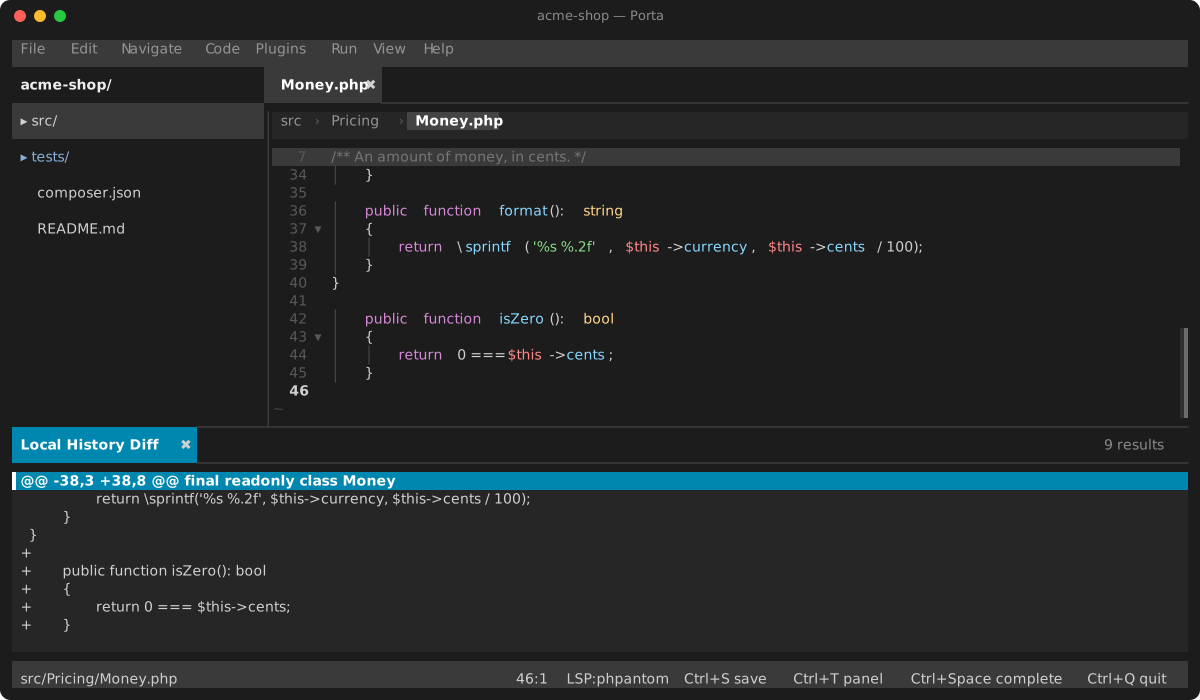
Compare with Local History (the command palette, or a right-click on the editor or on a file) shows what a snapshot would change before you restore it: pick one, and the diff opens in its own panel — oldest on the left, so a - line is what restoring would bring back and a + line is what it would take away. The newest snapshot is always the file as it stands, because saving is what takes one, and picking it says so rather than opening an empty panel.
Recent Changes (the command palette) answers the other question — not "what did this file look like before", but "what have I been changing", which is what you want when you do not yet know which file to ask about. It lists every file with history, the file changed last on top, with when it changed and how many versions it has; Enter opens one, and Ctrl+Alt+H on it then shows that file's snapshots.
A file you deleted is still in that list, and Enter on it goes straight to its snapshots — there is no file to open, and its history is now the only copy left, which is the case local history exists for. Restoring a version then recreates the file and opens it. That is the one restore that writes to disk: everywhere else Enter replaces the buffer and saving stays yours, because a file that exists is yours to keep; here there is nothing to keep and nothing to overwrite.
A history directory is named after a HASH of the path, so each one records its own path in a small sidecar file. Directories written before that existed are recovered the first time you open this view: a hash cannot be inverted, but it can be recognised, and the paths worth trying are the files in your project — so the view hashes them and matches. That walk happens once (it skips .git, vendor, node_modules, .idea and .phpunit.cache, and stops at 20,000 files), and whatever it cannot name is marked so it is not walked for again. A file it skipped or could not find gets its name on the next save.
That comparison is the one part that needs git on your PATH — it runs git diff --no-index, which takes two arbitrary paths and so works in a project that is not a repository. Without git the snapshots still record and still restore; only the comparison is unavailable, and it says so.