
Diff
The diff the other plugins show — the pane the Git view and code review draw a file's changes in, and the model behind it, a unified diff read into hunks with the changed words inside a changed line picked out — and the merge view. Enabled by default, because git needs it: a project whose enabledPlugins names git must name diff too, or git is skipped with a warning. Disabling it disables the plugins that need it.
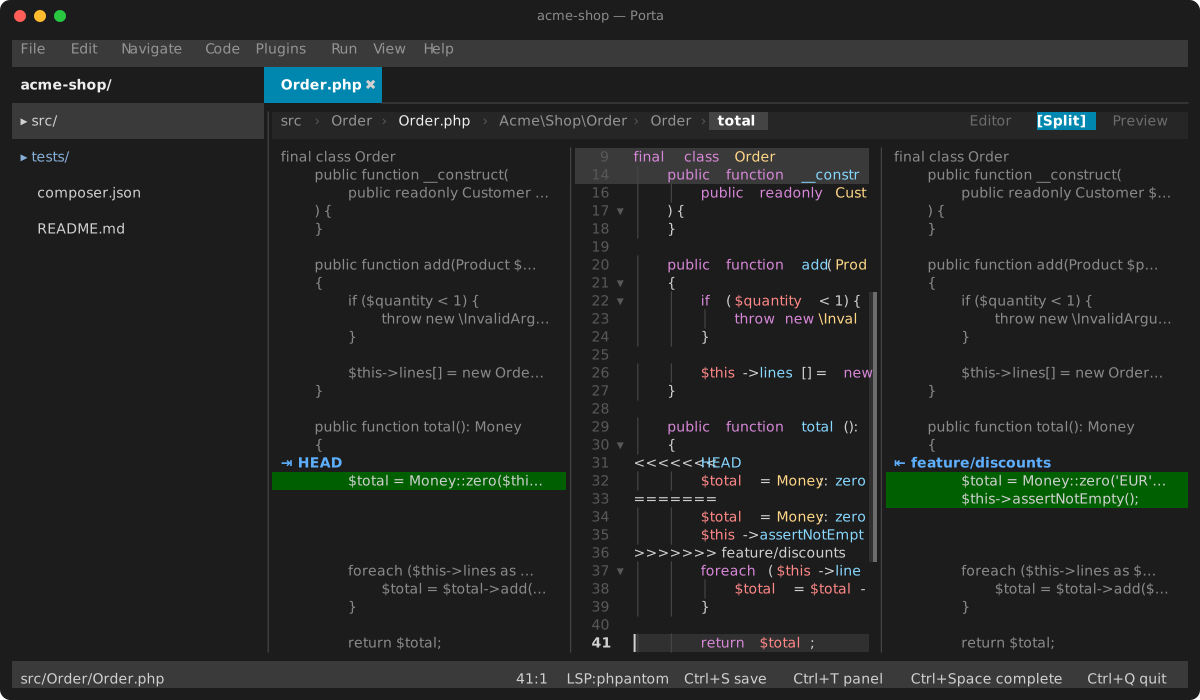
The merge view
A file holding conflict markers opens as three columns: ours on the left, the result in the editor between, theirs on the right. It does so however the file got its markers — a git merge or git rebase that stopped on a conflict, or git mergetool launching Porta on it (setup).
Each side is the result with every conflict replaced by that side's lines, drawn level with the result, and the three scroll as one. A conflict's first row on a side is its label — the branch git named — behind an accept mark: ⇥ on ours, ⇤ on theirs. Click it, or press a with the keys on that side, and the result keeps that side's lines for the conflict; b keeps both, ours first. Each is one undo step in the editor, and the result is still the editor's text: edit it by hand as much as you like. A diff3 or zdiff3 base section is neither side's and is never kept. The status bar says which conflict of how many the keys act on — the one the caret is in, else the next below it — and, once none is left, that the result only needs saving.
The two sides read the markers, not git: a change git merged by itself outside the conflicts is in the result already, on both sides alike. Drag the dividers to resize the columns; each keeps its width. A narrow window drops ours first, then theirs, and keeps the result.
Under soft wrap a long line takes several rows in the editor, and as many on each side: a side's own text wraps at its column's width, blank rows below it when it is shorter, its last row cut with … when it is longer. A row of the result's that holds no text — a code lens above a line, a block under one — is blank on each side, and a folded stretch is folded on the sides too, so the three columns stay level whatever the editor draws. A wheel notch over a side scrolls the editor as one over it does, a row at a time.
The diff pane
Unified (dual gutters) or side-by-side, added rows on a green band and deleted ones on a red one, the changed words a shade stronger. Its file header is one bar row — the path, its folder dimmed — and the ⚙ ▾ at its end drops the display settings. What a key does beyond moving and copying is up to the view the pane is in: in the Git view Space stages, in a read-only comparison it does nothing.
A line longer than the pane scrolls sideways with ← / → — or, with core's soft wrap on (Alt+Z, the softWrap setting), continues on the rows below: its line numbers and ± marker on the first row only, and side by side the shorter half blank, still banded, until the taller one ends. Nothing scrolls sideways while it wraps; the wheel scrolls a screen row at a time instead, so the end of a line taller than the pane is in reach.
Settings
None.
Keys
In the merge view, with the keys on ours or theirs:
| Key | Action |
|---|---|
a / Enter | Keep this side for the conflict |
b | Keep both, ours first |
n / p | The caret to the next / previous conflict |
Ctrl+S | Save the result, as from the editor |
In the diff pane:
| Key | Action |
|---|---|
↑ / ↓, PgUp / PgDn | Move the cursor row |
← / → | Scroll sideways |
v | Start a line range |
Space | Act on the hunk or the range — stage it, in the Git view |
c | Cycle the context around each hunk |
s | Toggle unified / side-by-side |
w | Toggle hiding whitespace-only changes |
Ctrl+C | Copy the selected lines |
Tab | Next pane of the view |
Esc | Leave the view |