
custos
custos inspects PHP code and fixes what it finds. The plugin runs it beside your PHP language server (phpantom or phpactor) rather than instead of it. Bundled with Porta and off by default — turn it on under Settings → Plugins → custos.
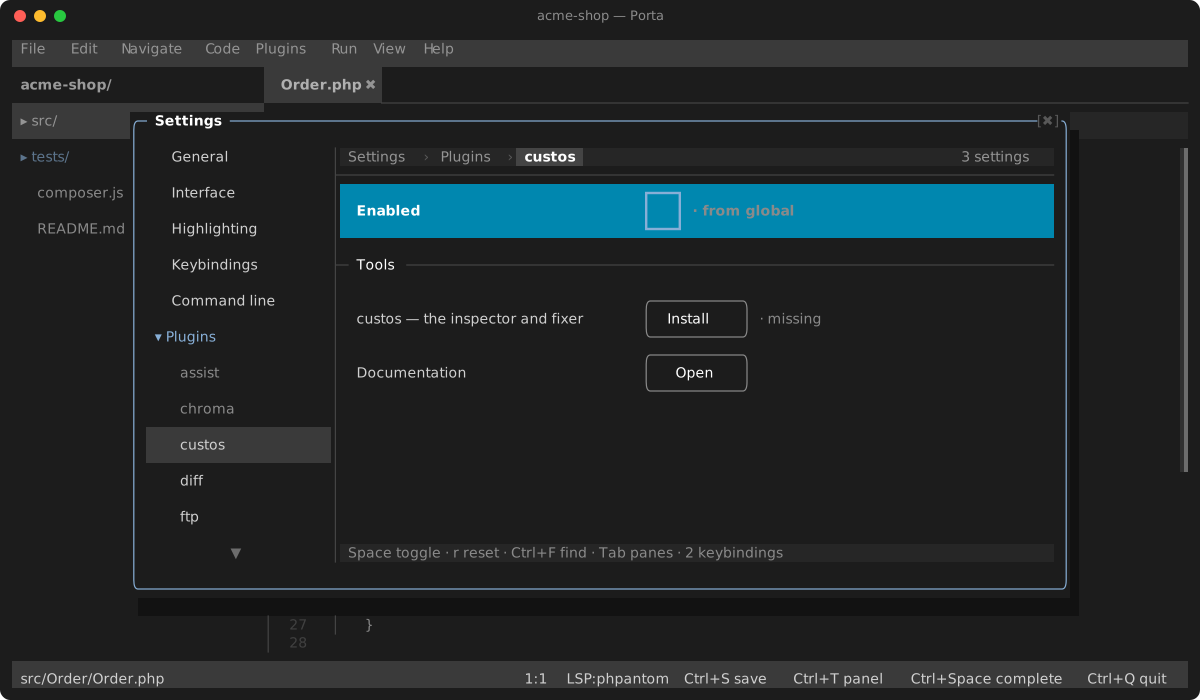
The plugin runs custos from its custos binary setting when you set one, otherwise from your PATH, then from ~/.porta/bin. Its Settings page installs it for you: the custos row under Tools downloads the release built for your machine from GitHub (janalis/custos), checks it against the release's checksums and puts it in ~/.porta/bin — or, where there is no such build, installs the Homebrew cask janalis/tap/custos. The same row updates it later.
In the editor
custos lsp starts with every PHP file you open:
- Its findings appear with your language server's, each one named by its rule (the code beside the message) and attributed to
custos. Alt+Enteron a line custos flagged lists its quick-fixes together with your language server's code actions, plus custos: fix all problems in file. Picking one applies it as one undoable edit.
When no other plugin serves PHP, custos is promoted to the PHP server, and then it is the only one: it does no completion or navigation.
Fixing a file
Custos: Fix File (the Plugins menu or the palette) runs custos fix on the active file and applies the result to the buffer, one Ctrl+Z away. The fixer works on the file on disk, so save first: on a buffer with unsaved changes the command says so instead of running.
Configuration
custos reads custos.json (and composer.json for the target PHP version) at the project root: which rules run, their severities and options. Two settings override the project's config without editing it:
- Target PHP version — e.g.
8.3. Left empty, the project config decides. - Comparison style —
regular($x === null) oryoda(null === $x).projectleaves it to the project config.
The language server picks up a change at once: it restarts with the new values. Custos: Fix File passes the same overrides to custos fix, so a fix follows the same rules as the quick-fixes.
Settings
| Setting | Default | What it does |
|---|---|---|
| custos binary | empty | The executable to run; empty finds custos on the PATH, then in ~/.porta/bin |
| Target PHP version | empty | Overrides the project's target PHP version; empty leaves it to custos.json / composer.json |
| Comparison style | project | regular or yoda overrides the project's comparison style; project leaves it to the project config |
Keys
The plugin binds no key of its own; custos's fixes come up on the editor's quick-fix key.
| Key | Action |
|---|---|
Alt+Enter | Quick fixes, custos's among them |