
Composer
Composer from the editor: which of your dependencies have newer releases, and install, update, require and remove without leaving it. Bundled with Porta and off by default — turn it on under Settings → Plugins → composer.
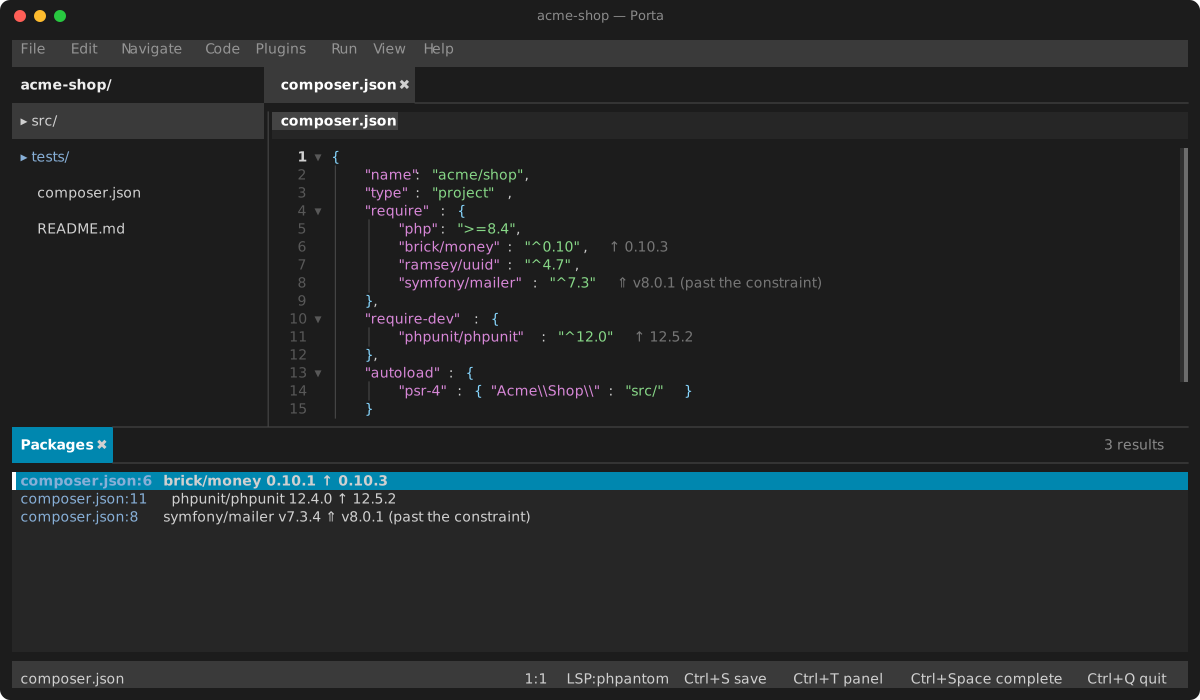
Six commands, in the Plugins menu and the command palette:
- Composer: Show Outdated Packages asks Composer which of your direct dependencies have newer releases.
- Composer: Install runs
composer install. - Composer: Update All runs
composer update. - Composer: Update Package at Caret (also on the editor's right-click menu) runs
composer updatefor the package required on the caret's line of composer.json. - Composer: Require Package… asks what to require —
vendor/name, a constraint after a colon (vendor/name:^2.0),--devfor a development dependency — and runscomposer requirewith it. - Composer: Remove Package at Caret runs
composer removefor the package required on the caret's line of composer.json.
Outdated packages
What is out of date shows in two places:
- The Packages tab in the bottom dock lists each package with its installed version and the newest one.
Enterjumps to the line requiring it in composer.json, andF5asks again. - In composer.json, the line requiring each one is marked at its end.
A mark says how far behind the package is:
| Mark | Means |
|---|---|
↑ 1.4.2 | A newer release your constraint allows: composer update gets it |
⇑ 2.0.0 (past the constraint) | A newer release your constraint does not allow: change the constraint first |
⚠ abandoned, use … | The package is abandoned, and what to use instead when its author said |
Only your direct dependencies are listed: those composer.json requires. The question is asked with Composer's own plugins off, so it runs nothing of the project's.
Running Composer
Install, update, require and remove run in a Composer terminal tab, where Composer's output, and any question it asks, are yours to read and answer. composer.json is saved first if it has edits, since Composer reads — and may rewrite — the file on disk. When a run succeeds after you have asked what is out of date, the plugin asks again, so the tab and the marks describe the project as it now is. A run that fails says so, with its exit code.
The plugin finds composer through its composer binary setting when you set one, then your PATH. While neither resolves, its menu entries stay dimmed, and its page under Settings → Plugins offers to install it (brew install composer). Composer runs the project's scripts and its own plugins, so the plugin runs it only in a project you trust, and not in a project opened over SSH or FTP.
Settings
| Setting | Default | What it does |
|---|---|---|
| composer binary | empty | The executable to run; empty finds it as above |